


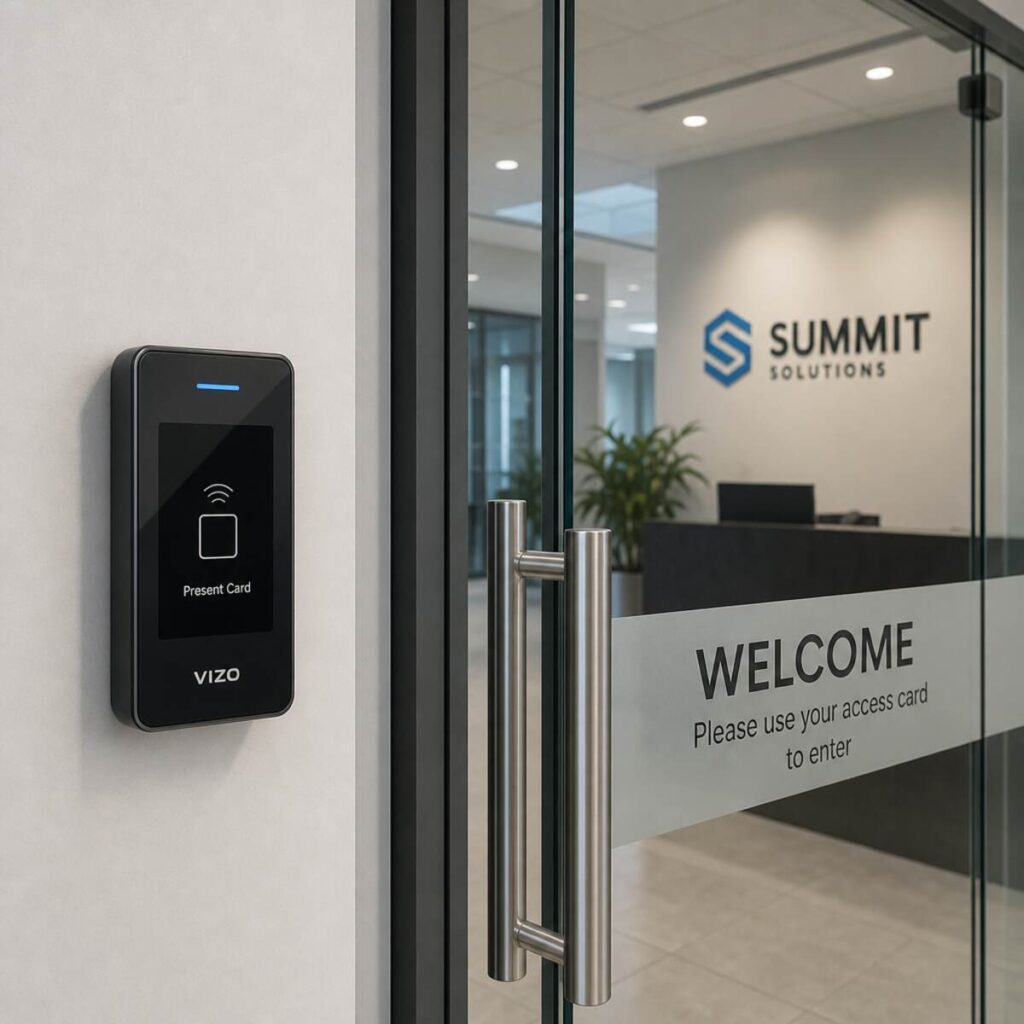
Imagine arriving at your office building and, instead of fumbling through your pockets or purse for a heavy brass ring of keys, you simply walk up to the door. A sleek reader scans your smartphone, verifies your identity, and a quiet click signals that the door is unlocked. Behind the scenes, a secure database logs your entry time, turns on the lights in your department, and signals the alarm system to disarm your specific zone. Obtain the Best information about Access Control Installation.
This is the reality of modern physical security. Gone are the days when a simple padlock and a deadbolt were enough to protect commercial assets, sensitive data, and, most importantly, human lives. As businesses grow more complex, the need to control who goes where—and when—has never been more critical.
If you are a business owner, a facility manager, or an IT professional tasked with securing a commercial space, you are likely realizing that physical security is just as important as cybersecurity. But making the leap from traditional locks to a sophisticated electronic ecosystem requires careful planning, strategic design, and flawless execution. This is where professional Access Control Installation becomes not just an upgrade, but a vital business investment.
In this comprehensive guide, we will explore the profound benefits of hiring experts to handle your security system installation. We will delve deep into the anatomy of these systems, examine the latest authentication technologies, guide you through the planning process, and provide actionable insights to secure your commercial environment effectively.
The Paradigm Shift: Migrating from Legacy Key Systems to Digital Access
For decades, the mechanical lock and key were the undisputed champions of physical security. However, in today’s fast-paced, high-turnover corporate environments, traditional keys present massive logistical nightmares and severe security vulnerabilities.
Migrating from legacy key systems to digital access is often the first step a growing business takes toward true operational security. Let’s look at why legacy systems are failing modern enterprises:
- The Cost of Lost Keys: When an employee loses a physical key, the only way to guarantee security is to rekey the entire facility. This involves hiring a locksmith, replacing the lock cylinders, cutting new keys, and distributing them. This process is incredibly expensive and time-consuming.
- Zero Audit Trails: With a metal key, there is no way to know who entered a building, what time they entered, or how long they stayed. If a theft or an incident occurs over the weekend, a traditional lock provides absolutely no investigative data.
- Lack of Granular Control: A physical key is an all-or-nothing tool. You cannot program a metal key to only work between 9:00 AM and 5:00 PM, nor can you easily restrict a master key from opening the IT server room while allowing it to open the breakroom.
- Termination Risks: When a disgruntled employee leaves a company, retrieving their physical keys can be a tense and sometimes unsuccessful endeavor. Even if they return the key, they may have made unauthorized copies.
Digital access control systems eliminate all of these vulnerabilities instantly. When you shift to a digital ecosystem, a lost credential simply means logging into a software dashboard and deactivating a profile—a process that takes seconds and costs nothing.
Decoding the Hardware: What Are the Components of an Access Control System?
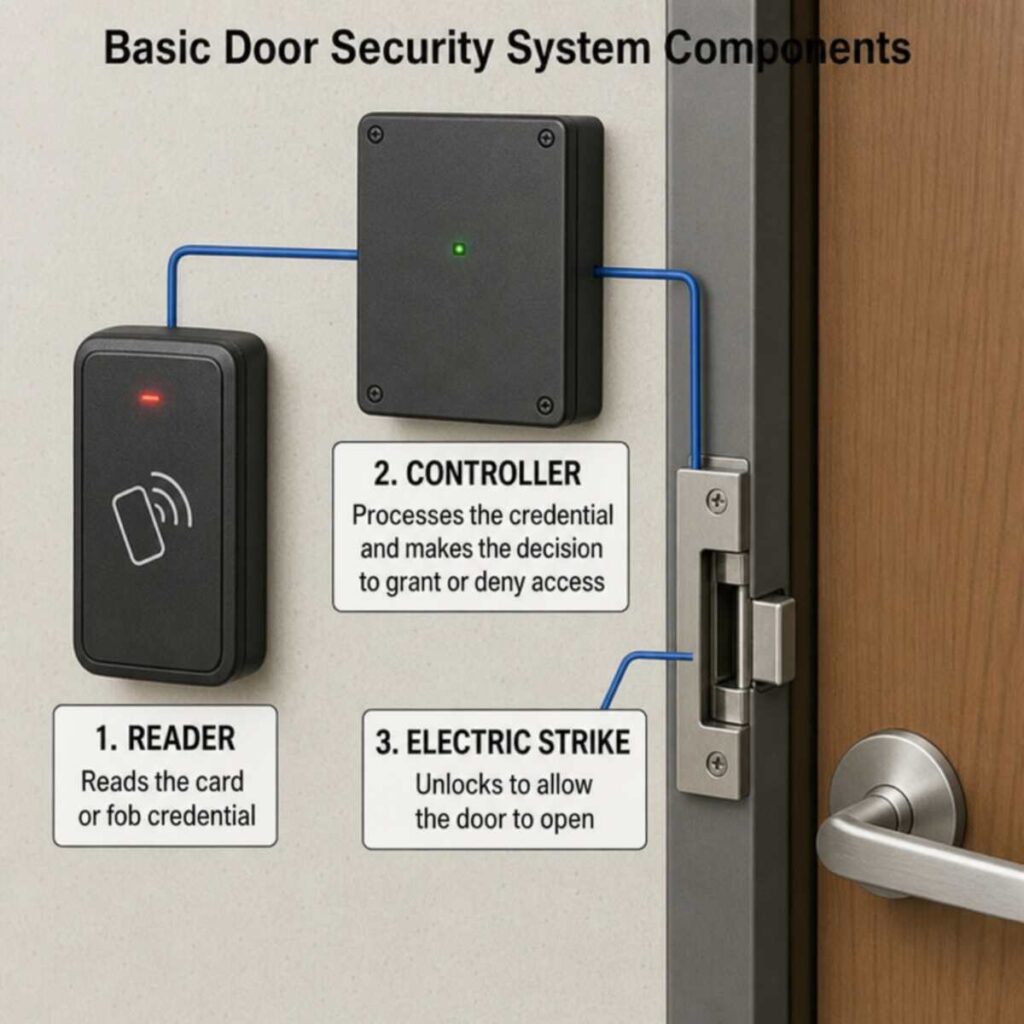
Before diving into the complexities of professional installation, it is crucial to understand the building blocks of the technology. If you have ever asked, “what are the components of an access control system?”, you are not alone. A properly functioning setup is a symphony of hardware and software working in perfect harmony.
Here is a breakdown of the core elements:
1. The Credentials (The “Key”)
A credential is what a user presents to a system to prove their identity. Modern credentials have evolved far beyond basic metal keys. They include:
- Key Fobs and Proximity Cards: Utilizing RFID (Radio Frequency Identification) technology, these are the standard in many corporate environments.
- Mobile Credentials: Using Bluetooth Low Energy (BLE) or Near Field Communication (NFC), smartphones and smartwatches can now act as highly secure, encrypted keys.
- PIN Codes: Users enter a memorized numeric code on a keypad.
2. The Readers (The “Locksmith”)
The reader is the device mounted on the wall next to the door. Its sole job is to capture information from the credential and securely pass it to the controller. Readers must be weather-resistant if installed outdoors and highly secure to prevent tampering.
3. The Access Control Panel / Controller (The “Brain”)
This is the central nervous system of the setup. Often hidden away in a secure IT closet, the controller receives the data from the reader, checks it against its internal database of authorized users and schedules, and makes the split-second decision to grant or deny access.
4. Electronic Locking Hardware (The “Muscle”)
If the controller approves the request, it sends an electrical signal to the door lock. The electronic door lock hardware integration is a highly specialized part of the installation. Common types include:
- Magnetic Locks (Maglocks): Electromagnets that hold a door shut with hundreds or thousands of pounds of force.
- Electric Strikes: Devices that replace the standard strike plate on a door frame, allowing the door to be pulled open without turning the knob.
- Electrified Mortise Locks: Heavy-duty locks in which the electronic components are housed entirely within the door.
5. The Management Software (The “Command Center”)
The software serves as the user interface through which IT or security administrators manage the system. This is where you add new employees, set up time-based access schedules, revoke permissions, and run audit reports.
The Strategic Advantage: Keyless Entry System Benefits for Businesses
Investing in professional Access Control Installation yields a high return on investment by solving multiple operational challenges simultaneously. The keyless entry system benefits for businesses extend far beyond simply keeping the bad guys out.
Unprecedented Convenience and Frictionless Access
Your employees want a frictionless work environment. Fumbling for keys slows people down and creates frustration, especially for staff carrying equipment or materials. With modern systems—particularly those utilizing mobile credentials—employees can often unlock doors simply by walking up to them with their smartphone in their pocket. This seamless experience boosts daily morale and paints your company as a modern, forward-thinking enterprise.
Real-Time Auditing and Reporting
Imagine knowing exactly when your opening manager arrived, how long the cleaning crew stayed, and who was the last person to leave the warehouse on a Friday evening. Access control provides real-time, highly granular data. If an incident occurs, you can instantly pull a report showing every individual who accessed a specific area during a specific timeframe, turning a complicated investigation into a matter of keystrokes.
Remote Management and Multi-Site Scalability
For businesses with multiple locations, centralized management is a game-changer. A facility manager sitting in New York can unlock a door for a delivery driver at a warehouse in Chicago with a single click. Furthermore, HR departments can seamlessly onboard a new executive, granting them access to the corporate offices in London, Tokyo, and San Francisco simultaneously through one centralized software dashboard.
Enhanced Safety During Emergencies
Modern access control systems are deeply integrated with fire alarms and life safety codes. In the event of a fire, a professional installation ensures that doors automatically unlock (fail-safe mode), allowing occupants to evacuate quickly and safely without being trapped by electronic locks. Furthermore, lockdown features allow administrators to secure an entire campus with the push of a button during an active threat scenario.
Laying the Groundwork: The Site Survey for Security System Planning
One of the most significant differences between a DIY attempt and a professional Access Control Installation is the planning phase. Professionals do not simply start running cables; they begin with a rigorous site survey to plan the security system.
This survey is a comprehensive audit of your facility’s physical layout, daily operations, and specific security vulnerabilities.
What Happens During a Professional Site Survey?
- Vulnerability Assessment: Experts will walk the perimeter and interior of your building to identify weak points. They look for hidden entrances, vulnerable fire escapes, ground-floor windows, and areas with poor lighting.
- Door and Frame Hardware Audit: Not all doors can accommodate electronic locks easily. An installer must inspect the door materials (wood, steel, glass, aluminium), the condition of the frames, and the current mechanical hardware. This dictates the specific integration of electronic door lock hardware required.
- Network and Power Evaluation: Electronic security systems require stable power and robust network connectivity. The survey identifies the locations of IT closets, cable routing pathways (drop ceilings, conduits), and power availability.
- Workflow and Traffic Flow Analysis: Understanding how your employees and visitors move through the building is critical. Which doors see high traffic? Where do deliveries arrive? Which areas require maximum security (such as server rooms) versus medium security (such as break rooms)?
By conducting a thorough site survey, a professional integrator ensures that the final system design is tailored precisely to your operational needs and architectural constraints, preventing costly change orders and security gaps down the line.
Perimeter Defense: Best Practices for Securing Commercial Perimeters
Your access control system should not start at your front door; it should begin at the very edge of your property. Implementing best practices for securing commercial perimeters creates a layered defense strategy, often referred to as “defense in depth.”
Layer 1: The Outer Perimeter (Property Lines)
The goal of the outer perimeter is to deter and delay unauthorized entry onto your property.
- Fencing and Gates: Industrial fencing integrated with motorized gates ensures that only authorized vehicles can enter parking lots or loading docks. Access control readers mounted on gooseneck pedestals allow employees to swipe their badges without leaving their cars.
- Strategic Lighting: A well-lit perimeter is one of the most cost-effective deterrents against vandalism and theft. Motion-activated floodlights can startle intruders and alert security personnel.
- Environmental Design: Using natural landscaping, such as thorny bushes, large decorative boulders, or water features, can naturally guide visitors toward official entry points and away from restricted areas.
Layer 2: The Inner Perimeter (Building Envelope)
This layer consists of the exterior walls, doors, and windows of your actual building.
- Securing All Entry Points: Every single exterior door—including roof hatches, fire exits, and loading dock bays—must be monitored. Even if a door is exit-only, it should be equipped with door position switches to alert administrators if it is propped open.
- Video Intercoms: For main entrances, integrating video intercoms allows receptionists or security guards to visually verify visitors before remotely unlocking the door.
- Anti-Tailgating Measures: Tailgating (when an unauthorized person follows an authorized person through a door) is a massive security risk. Installing optical turnstiles or security mantrap vestibules at main entrances mathematically forces individuals to authenticate one at a time.
Layer 3: The Interior (Zoning)
Once someone is inside, they should not have free rein of the entire facility.
- Micro-Zoning: Group interior doors into security zones. General employees might only have access to the main office and breakroom, while IT staff have exclusive access to server rooms, and executives have access to financial records rooms.
The Selection Process: How to Choose the Right Access Control System
With hundreds of hardware manufacturers and software platforms on the market, choosing the right access control system can feel overwhelming. Partnering with a professional installer simplifies this process, as they will guide you based on your specific use case. However, keeping the following criteria in mind will help you make an informed decision:
1. Scalability
Are you a small startup planning to double your headcount in the next two years? Or an established corporation looking to open three new regional offices? Your system must scale with you. Look for platforms that allow you to easily add new doors, users, and geographic locations without requiring a massive overhaul of the base software.
2. Open Architecture vs. Proprietary Hardware
Historically, many security companies built proprietary systems. If you bought their software, you were forced to buy their specific card readers and controllers. Today, the industry standard is leaning toward open architecture (often utilizing OSDP—Open Supervised Device Protocol). Open architecture allows you to mix and match hardware from different manufacturers, preventing you from being “locked in” to a single vendor.
3. API Integrations
Your access control shouldn’t live in a silo. Can the system integrate with your HR software (like Workday or BambooHR) to automatically grant access when a new employee is hired and revoke it when they are terminated? Can it integrate with your Active Directory for seamless user management?
4. Compliance and Regulatory Requirements
Depending on your industry, your security system might need to meet strict legal standards. Healthcare facilities must comply with HIPAA, requiring strict auditing of access to patient records. Financial institutions and data centers may need to meet SOC 2 or PCI-DSS compliance. Ensure the system you choose provides the robust, unalterable audit trails required by your specific regulatory body.
Architecture Decisions: Cloud-Based vs On-Premise Access Control
One of the most critical decisions you will make during your security system installation is where the “brain” of your system will live. The debate between cloud-based vs on-premise access control represents two fundamentally different IT philosophies.
On-Premise Access Control Systems
In an on-premise setup, the access control management software is installed on a physical server located inside your building.
- The Pros: You have complete, total control over your data. Because the system does not rely on an external internet connection to operate its management interface, you are immune to external internet outages. This is often the preferred choice for highly secure government facilities, defense contractors, and environments with strict air-gapped network policies.
- The Cons: On-premise systems require significant upfront capital expenditure. You must purchase the servers, house them in a climate-controlled room, and dedicate internal IT resources to maintain them. Furthermore, applying software updates and security patches is a manual process, meaning your system can become vulnerable to cyber threats if your IT team falls behind. Remote management is also more complex and usually requires a VPN.
Cloud-Based Access Control Systems
In a cloud-based system (Access Control as a Service, or ACaaS), the management software is hosted on remote, secure servers operated by the vendor (such as AWS or Microsoft Azure). You log into a web browser or mobile app to manage your doors.
- The Pros: Cloud systems are incredibly agile. There are no expensive servers to buy or maintain. Software updates, new features, and critical security patches are automatically pushed over the air by the vendor. Cloud systems allow for true remote management; you can unlock a door or change user permissions from your smartphone while sitting in a coffee shop halfway across the world. They also integrate much more smoothly with other cloud-based SaaS tools.
- The Cons: Cloud systems typically operate on a subscription model (monthly or annual fees per door or per user), shifting costs from CapEx to OpEx. They also require a reliable internet connection to make administrative changes (though the local controllers will continue to grant/deny access to existing users even if the internet goes down).
For the vast majority of modern businesses, cloud-based systems are becoming the de facto standard due to their flexibility, ease of use, and lower total cost of ownership over time.
Beyond the Badge: Exploring Biometric Authentication Technology Types
While proximity cards and mobile credentials are highly secure, they are still something a person has. They can be lost, stolen, or handed to a coworker. In high-security environments, the industry is rapidly shifting toward verifying a person’s identity.
Understanding the different types of biometric authentication technology is essential for facilities requiring the highest level of security. Professional installers can seamlessly integrate these advanced readers into your ecosystem.
1. Fingerprint Scanners
The most common and cost-effective biometric technology. Fingerprint scanners map the unique ridges and valleys of a user’s finger. While effective, they can sometimes struggle with dirty, wet, or worn fingers, making them less ideal for manufacturing or industrial environments.
2. Facial Recognition
Rapidly becoming the gold standard for frictionless access. Modern facial recognition readers use 3D mapping and infrared technology to ensure they cannot be spoofed by a photograph or a mask. As an employee walks toward a door, the camera reads their face in milliseconds and unlocks the door without them ever breaking stride. It is highly hygienic, as it is completely touchless.
3. Iris Recognition
Scanning the complex, unique patterns of the coloured part of the eye provides mathematical accuracy that far exceeds that of fingerprints. Iris scanners are typically used in ultra-high-security environments like data centers, research labs, or government intelligence facilities.
4. Palm Vein Scanners
This incredible technology uses near-infrared light to map the unique vein patterns beneath the skin of the hand. Because the veins are inside the body, it is virtually impossible to forge or steal this biometric data. It is highly secure, fast, and works well even if a user’s hands are dirty.
The Ultimate Defense: Multi-Factor Authentication for Physical Entry Points
In the cybersecurity world, relying solely on a password is considered reckless; you need a password and a text message code (Two-Factor Authentication). The physical security world has adopted this exact philosophy.
Implementing multi-factor authentication for physical entry points guarantees that a stolen credential alone is not enough to breach your facility.
For highly sensitive areas, such as server rooms, pharmaceutical storage, or executive suites, a professional access control installation can configure doors to require two or more of the following factors:
- Something you have: A key card, fob, or mobile phone.
- Something you know: A memorized PIN code typed into a keypad.
- Something you are: A biometric scan (face, fingerprint, iris).
For example, a data center might require a standard swipe card to enter the main lobby. However, to enter the actual server floor, an employee might have to swipe their card and present their fingerprint. This layered approach ensures that even if an employee loses their badge on the train, the finder cannot access your most critical assets.
The Engineering Behind the Security: Step-by-Step Physical Security Setup
Many people underestimate the sheer complexity of a professional security system installation. It is not just about mounting a reader on a wall; it requires deep knowledge of low-voltage electrical work, fire codes, IT networking, and mechanical door hardware.
Here is a glimpse into the step-by-step physical security setup executed by professional integrators:
Phase 1: Cable Pulling and Infrastructure
Before any devices are mounted, the central nervous system must be laid. Technicians run low-voltage wiring (such as composite access-control cables) from the central IT closet to every single door. This requires navigating drop ceilings, penetrating fire-rated walls (and properly fire-stopping them afterwards), and ensuring cables are protected from electrical interference.
Phase 2: Hardware Installation and Door Modifications
This is the most physically demanding phase. Technicians drill through concrete walls to mount card readers. They carefully core drill wooden doors or modify metal door frames to house electronic locks. This work must be incredibly precise; if an electric strike is misaligned by even a fraction of an inch, the door will not secure properly.
Phase 3: The Brains – Controller Wiring
Back in the IT closet, the cables terminate at the access control panel. This is a complex web of wires requiring meticulous labeling and organization. A professional installer will consult specific documentation, such as a magnetic lock wiring diagram, to ensure the lock is wired to fail-safe (unlock upon power loss) rather than fail-secure, ensuring compliance with emergency egress life safety codes.
Phase 4: Network Integration and Power
The controllers are connected to the building’s local area network (LAN) to communicate with the software. They are also wired to dedicated power supplies backed by heavy-duty batteries, ensuring your doors remain secure and functional even during a widespread municipal power outage.
Phase 5: Software Provisioning and Testing
Finally, the software is configured. The installer maps the facility, names every door, sets up initial user profiles, and creates access schedules. Then, rigorous testing begins. Every credential type is tested. Fire alarm drops are tested to ensure doors automatically unlock during a simulated fire. Door props are tested to ensure alarms trigger correctly.
Powering the Future: Power Over Ethernet for Security Controllers
One of the most revolutionary advancements in modern Access Control Installation is the adoption of PoE technology. Using power over ethernet for security controllers fundamentally changes how systems are designed, saving businesses money and simplifying IT management.
Historically, securing a single door required multiple cables and a dedicated, bulky power supply mounted nearby on the wall. PoE changes this entirely.
With PoE, a single standard Cat5e or Cat6 network cable runs from a central PoE switch directly to an IP-enabled door controller mounted just above the door. This single, inexpensive cable carries both the data communication back to the software and the electrical power required to operate the card reader and the electronic lock.
The Benefits of PoE Access Control:
- Reduced Installation Costs: Running one ethernet cable is significantly faster and cheaper than running heavy composite access control cables and hiring high-voltage electricians to install dedicated power outlets.
- Centralized Power Backup: Instead of needing individual backup batteries at every single door, you simply plug your central PoE network switch into a large Uninterruptible Power Supply (UPS) in your server room. If the building loses power, your IT infrastructure keeps your security system running seamlessly.
- IT Synergy: IT departments love PoE devices because they can monitor the health and power draw of every door directly from their existing network management tools.
The Perfect Marriage: Integrating CCTV with Door Entry Systems
An unlocked door is a great operational tool. A door that unlocks while simultaneously capturing a high-definition video clip of the person entering is an unparalleled security asset.
Integrating CCTV with door entry systems transforms two reactive, separate systems into one proactive, intelligent ecosystem.
When these systems operate in silos, investigating an incident is tedious. If an unauthorized entry occurs at 2:14 AM on a Sunday, a security manager has to log into the access control software, find the timestamp, then log into the video surveillance software, scrub through hours of footage, and manually match the time to see what happened.
With a unified platform installed by a professional, this process is automated.
Powerful Video and Access Integrations:
- Visual Verification: When an event occurs (e.g., “Front Door Unlocked by John Doe”), the software automatically ties a 10-second video clip to that specific log entry. You click the log, and the video of John walking through the door plays instantly.
- Credential Sharing Detection: If an employee gives their badge to a friend to sneak into the building, the access log will show the employee’s name, but the integrated video camera will instantly show a different face. Some advanced AI systems can even flag this discrepancy automatically.
- Door Forced Open Alarms: If a door is pried open with a crowbar, the access control system generates an alarm. The integration immediately pushes a live video feed of that door to the security desk monitor, allowing guards to assess the threat instantly without searching for the right camera.
Navigating Complexities: Electronic Door Lock Hardware Integration
As mentioned earlier, the physical locks are the “muscle” of the system. However, getting the muscle to work with the brain requires expert knowledge of electronic door lock hardware integration. A professional installer evaluates each door individually because there is no one-size-fits-all lock.
Fail-Safe vs. Fail-Secure: A Life or Death Distinction
This is arguably the most critical aspect of installation, and it is heavily regulated by the National Fire Protection Association (NFPA) and local building codes.
- Fail-Safe: These locks require continuous power to stay locked. If the power is cut (either by a power outage or a signal from the fire alarm panel), the door automatically unlocks. Magnetic locks are inherently fail-safe. These are used on main egress routes to ensure people can always escape during a fire.
- Fail-Secure: These locks use mechanical components to remain locked and require a power surge to unlock. If the power goes out, the door remains locked from the outside (maintaining security) but usually allows free mechanical egress from the inside (you can still turn the handle to get out). Electric strikes and mortise locks are typically fail-secure.
The Magnetic Lock Conundrum
Installing a magnetic lock is not as simple as bolting a magnet to a door. Because they are fail-safe and have no mechanical release, building codes mandate specific overrides. A professional installer understands that a complete magnetic lock wiring diagram must include:
- The Maglock itself.
- A Request-to-Exit (REX) Motion Sensor: Mounted above the door, this sensor detects someone walking toward the door from the inside and temporarily cuts power to the magnet, allowing them to exit.
- A Push-to-Exit Button: A secondary, manual button mounted on the wall. If the motion sensor fails, pressing this button physically breaks the electrical circuit, releasing the door.
- Fire Alarm Tie-in: A direct relay from the building’s fire alarm panel that globally drops power to the lock upon fire alarm activation.
Attempting to DIY this integration without understanding life safety codes is not only a massive security risk but a significant legal and financial liability.
Ensuring Uptime: Troubleshooting Card Reader Connectivity Issues
Even the most robust, professionally installed systems will occasionally require maintenance. Environmental factors, network changes, or physical damage can impact performance. Knowing the basics of troubleshooting card reader connectivity issues can help you communicate effectively with your service provider and minimize downtime.
If a card reader suddenly stops responding or displays a red LED error state, professionals follow a logical diagnostic path:
1. The Power Check
Is the reader getting power? If the LED lights are completely dark, the issue is almost certainly power-related. The technician will check the PoE switch, the power supply board in the IT closet, and the physical wire connections at the reader to ensure that no wire has been knocked loose.
2. The Network Check
If the reader has power but isn’t passing data to the software, it’s a communication issue. Technicians will ping the IP address of the door controller. Has the IT department recently changed firewall rules, VLAN configurations, or subnets? Often, an overzealous IT security update can inadvertently block the access control controller from communicating with the cloud server.
3. The Credential Format Check
If the reader beeps and flashes, but access is denied for a user who should have access, it might be a format issue. Did the company recently purchase a new batch of key fobs? Proximity cards come encoded in specific formats (like 26-bit, 37-bit, etc.). If the new cards are a different format than the reader is programmed to accept, it will read the card but misinterpret the data, resulting in a denial.
4. Environmental Interference
Readers mounted on metal surfaces can sometimes experience signal degradation (as the metal absorbs the RF field). Professional installers use special backplates to isolate the reader from the metal. If a reader suddenly loses range, a technician will check for newly introduced sources of electromagnetic interference, such as new heavy machinery or high-voltage lines installed nearby.
The Financial Perspective: ROI of Security System Installation
For many CFOs and business owners, upgrading physical security is viewed primarily as an expense. However, a modern, professionally installed access control system offers a tangible Return on Investment (ROI) that extends across multiple departments.
- Reduction in Guard Costs: A robust electronic perimeter with video integration can often replace the need for physical, 24/7 security guards at multiple entrances, saving tens of thousands of dollars annually in payroll.
- Lower Insurance Premiums: Commercial insurance providers place significant weight on physical security when calculating liability and property insurance rates. A documented, state-of-the-art access control system—especially one with fire alarm integration—often qualifies a business for significant premium discounts.
- Operational Efficiency: Eliminating the costs of physical keys, lock rekeying, and administrative hours spent manually tracking employee access yields continuous operational savings.
- Asset Protection and Liability Mitigation: The cost of a stolen server, leaked proprietary data, or a lawsuit resulting from a workplace violence incident far exceeds the cost of a professional security system installation. By proactively managing access, you are insulating your business against catastrophic financial events.
Conclusion: Securing Your Business’s Future
In an era when the boundary between physical and digital security is rapidly blurring, relying on traditional brass keys is a vulnerability no modern business can afford. The transition to an intelligent, automated security ecosystem is an inevitable step in your company’s growth.
However, as we have explored, the complexities of hardware integration, network architecture, biometric data privacy, and life-safety fire codes make this transition far more intricate than hanging a smart lock on your front door.
Investing in professional Access Control Installation guarantees that your system is designed with strategic foresight, installed with technical precision, and configured for maximum scalability. By choosing the right access control system, integrating it seamlessly with your CCTV and HR platforms, and maintaining a rigorous defense-in-depth perimeter, you are doing more than just locking doors.
You are creating a frictionless, modern workplace for your employees. You are protecting your physical and digital assets. And most importantly, you are securing the peace of mind that allows you to focus on what you do best: running and growing your business.
Take the first step today. Reach out to a certified physical security integrator, request a comprehensive site survey, and unlock the future of your facility’s security.